
How to Choose a Shopify Mobile App Platform (2026 Buyer's Guide)
Choosing a Shopify mobile app platform looks like a feature-comparison exercise. It isn't. Almost every builder on the market can publish an iOS and Android app from your store, slap your logo on it, and sync your catalog. If you shop on feature checklists, they all start to look the same — and you'll pick on price or whoever's demo looked slickest.
The decision that actually matters runs underneath the features: what is this app for, who really pays for it, and what happens when you want to leave? Get those wrong and you'll spend a year discovering that your "app" is a glossier bookmark, your monthly cost climbs as you grow, and your customer data lives in someone else's database.
This is a buyer's guide built around the questions that separate platforms that matter from platforms that demo well — plus the traps that cost merchants the most. Read it before you book a single sales call.
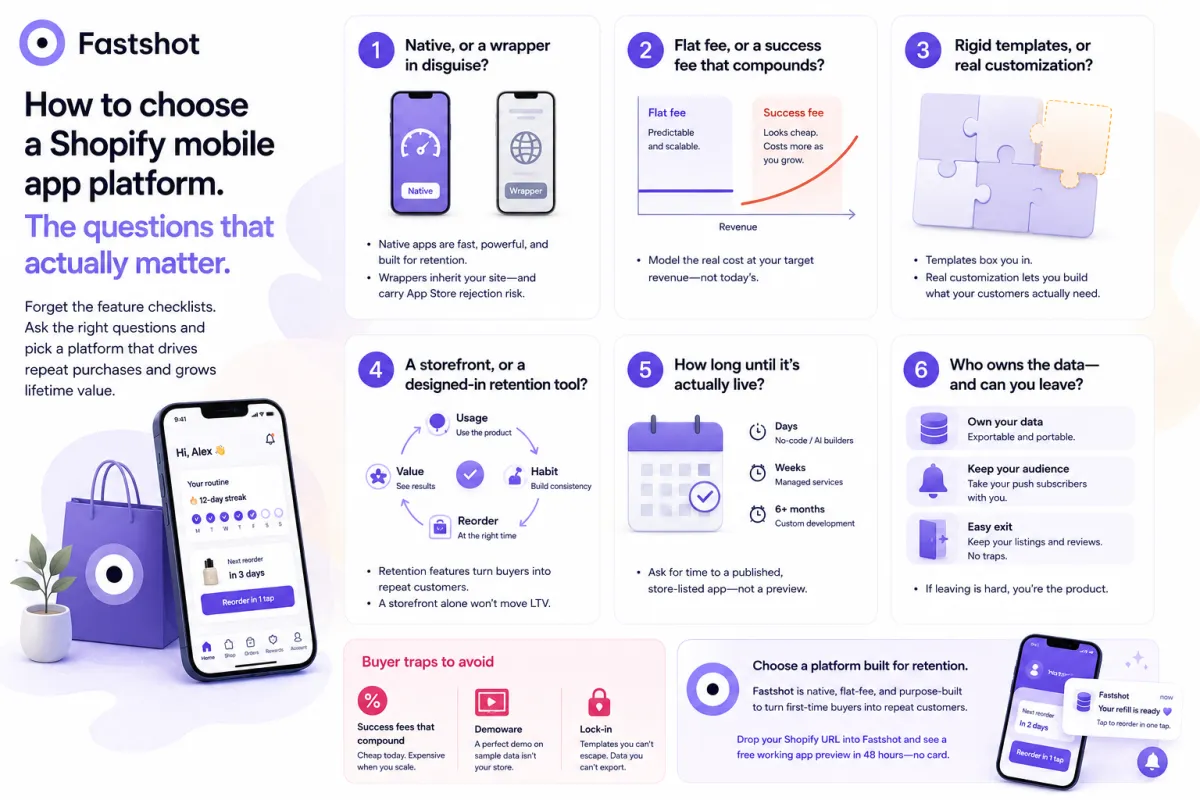
Question 1: Native, or a wrapper in disguise?
The first fork is technical, and the category obscures it on purpose. "Native" sells better than "we wrapped your mobile site," so a lot of builders blur the line.
- A WebView wrapper loads your existing website inside a native shell. It inherits your site's speed, can't host an experience your site doesn't already have, and carries App Store rejection risk under Apple's "more than a repackaged website" rule.
- A true native app is built with native components and talks to Shopify over an API. It feels owned, handles gestures and native push reliably, and gives you a real surface to build on.
Ask directly: is this native, a wrapper, or a PWA? If retention is the goal, you want native — wrappers and PWAs can't reliably host a behavior loop or full iOS push. Our WebView vs. PWA vs. native breakdown covers exactly where each one breaks.
Question 2: Flat fee, or a success fee that compounds?
This is the single most expensive question, and it's easy to get wrong because the trap is backloaded.
There are two pricing philosophies in this market:
- Flat fee — a predictable monthly subscription regardless of how much the app sells. Your cost is fixed; your upside is yours.
- Success fee / revenue share — a percentage of the revenue (or GMV) flowing through the app, on top of (or instead of) a base fee.
A success fee feels friendly on day one — "we only win when you win." But run the math at scale. Even 1–2% of app revenue becomes a serious, permanent tax precisely when the app is working. A platform that costs a few hundred a month flat can quietly cost thousands a month once it's driving real volume — and you keep paying it forever, for software you've already adopted. As a rule: the more successful your app, the more a success fee punishes you. See Shopify mobile app cost for how these models diverge over time.
Question 3: Rigid templates, or real customization?
Most builders hand you a drag-and-drop editor with a fixed set of blocks. That's fine for a clean storefront — and limiting the moment you want something your category actually needs.
- Template-bound platforms get you live fast but box you into the layouts they shipped. If your business needs a routine builder, a usage tracker, or a category-specific flow, you're stuck.
- Genuinely customizable platforms can shape the experience around how your customers use the product, not just how they browse.
Ask to build something off the happy path in the demo. If the editor can only rearrange the same storefront blocks, that's your ceiling.
Question 4: A storefront, or a designed-in retention tool?
This is the question that decides whether the app is worth building at all — and the one almost no comparison asks.
Most builders produce a storefront in an app: your catalog, a cart, a checkout. That's a better place to buy, but it does nothing once the customer leaves. With roughly 70% of customers gone after a first order, a prettier store doesn't move the number that matters.
A retention-designed app is a different machine: usage tracking with progress and streaks, routines mapped to how the product is actually used, reorder triggers timed to real depletion, and behavior-based push instead of blasts. The loop — usage to habit to reorder — is the point. Our piece on storefront vs. retention tool draws the line in detail. Decide which one you're buying before you compare anything else, because it reframes the entire shortlist.
Question 5: How long until it's actually live?
Time-to-launch ranges wildly, and the headline number often hides the real one.
- Custom native development historically meant six months or more to a first version.
- No-code and AI builders have collapsed that — you can have a working app in days.
- Managed "mirror your site" services sit in the middle: hands-off, but with a longer onboarding tail.
Ask for the honest time to a published, store-listed app — not time to a preview build. And ask what it costs you to evaluate: the best platforms will show you a real, working version of your store before you commit a card.
Question 6: Who owns the data — and can you leave?
The quietest trap is lock-in. An app accumulates customers, push subscribers, and behavioral data. Ask the questions nobody volunteers:
- Data ownership — is the customer and behavioral data yours, exportable, and portable, or trapped in the vendor's system?
- Push subscribers — if you switch platforms, do you keep your opt-in audience or start from zero?
- Exit terms — what happens to the published app, its store listings, and reviews if you leave?
A platform confident in its product makes leaving easy. One that makes it painful is telling you something.
The buyer traps to avoid
Beyond the questions, three patterns cost merchants the most:
- Success fees that compound. The friendliest-looking pricing is often the most expensive at scale. Always model the cost at your target revenue, not today's.
- Demoware. A flawless sales demo on cherry-picked data isn't your store. Insist on seeing your catalog in a real build before signing.
- Lock-in. Templates you can't escape, data you can't export, push lists you can't take with you. The switching cost is the real price.
For a head-to-head of the leading options, see our best Shopify app builders roundup and the Tapcart alternatives breakdown.
Where the major options land
To be fair to the field: enterprise platforms like Tapcart are legitimate, well-funded choices for large DTC brands that want a heavily designed app and have budget for it — their premium increasingly shows up as a success fee that scales with your revenue. Managed services that mirror your site suit teams that want hands-off. Template builders suit merchants who just need a clean storefront listing.
Fastshot sits in the last category from Question 4 — built native, flat-fee, and designed around retention rather than just replicating your store. That's the right pick if the app's job is repeat purchases and lifetime value, not just an App Store presence.
The fastest way to cut through every sales deck is to compare real builds of your own store. Drop your Shopify URL into Fastshot and see a free working app preview in 48 hours — no card — then hold it up against anything else on your shortlist.
Frequently asked questions
What's the most important factor when choosing a Shopify mobile app platform? Decide what the app is for first. If it's just a storefront listing, almost any builder works. If it's meant to drive repeat purchases and lifetime value, prioritize native performance, a retention-designed experience, and flat pricing over template polish.
Are success fees or flat fees better for a Shopify app? Flat fees are usually better long-term. A success fee looks cheap early but becomes a permanent percentage tax on your revenue exactly when the app is working — at scale it often costs far more than a fixed subscription for the same software.
How long does it take to launch a Shopify mobile app? It ranges from days to six-plus months. Custom native development is the slow end; no-code and AI builders can produce a working app in days. Ask each vendor for the honest time to a published, store-listed app — not just a preview.
See your app before you commit
Drop your Shopify store URL into Fastshot and get a free working app preview — built around your retention loop — in 48 hours. No card, no engineering.
Get my free preview →